Where to watch
Open the exact series on ReelShort’s website or in its app to see its episodes. A clip or ad may show only part of the title, so use the series page to confirm the story before choosing how to watch.
ReelShort is a short-drama platform with an official website, an iOS app, and an Android app. This independent Dravyra guide explains how ReelShort viewing and payments work, what to check when switching devices, and where to find account help.
Open the exact series on ReelShort’s website or in its app to see its episodes. A clip or ad may show only part of the title, so use the series page to confirm the story before choosing how to watch.

Coins, one-time purchases and VIP buy different kinds of access. The checkout shows the price, renewal period and what that particular offer includes. The App Store listing shows available purchase types, but the offer on your screen is the one to compare. See the U.S. App Store listing.

Some episodes offer ads or reward tasks instead of a paid unlock. Open the next episode of the drama you want: the choices shown there tell you what is free for that title and account today.

Your receipt identifies who billed a recurring plan. An Apple or Google Play subscription is managed through that store; a website purchase follows its own checkout and support route. Use the original billing channel when you need to change or cancel a plan.

Coins pay for eligible episode unlocks; reward tasks can open an episode when offered; VIP is a separate recurring plan. Compare the access each choice gives on the series you actually want to finish. Apple subscription instructions.
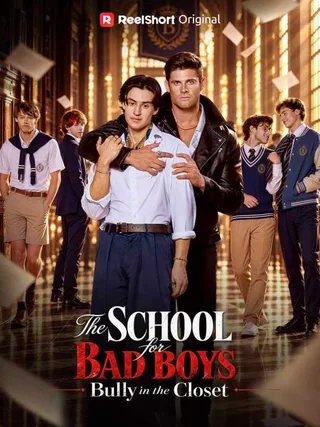
Easton and Xander hide their attraction at a school where being discovered could get them expelled.
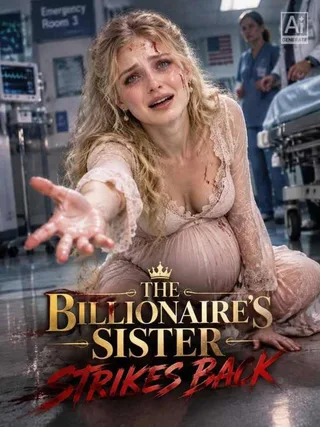
A pregnant heiress is bullied on her way to her brother's wedding by people who mistake her identity.

A road accident brings a Hollywood actor into Stevie's small-town life as viewers look for the next part of their story.

Cody and Beckett's forbidden romance is the earlier, separate story in ReelShort's reform-school series.

A woman forced into a mafia marriage fights the family rules that took away her freedom.

Some viewers report being prompted to continue in the app after watching in a browser. If that happens, use ReelShort’s official app, check the same account and verify existing paid access before purchasing again. Read the discussion.

ReelShort’s App Store listing names several interface languages. A title’s audio and subtitles can differ, so check the playback controls on the exact drama before paying for a language option. App Store language listing.

ReelShort’s developer responses point viewers to Profile → Feedback in the app. Include the series title, account and receipt privately when a purchase does not appear; that gives support the transaction to investigate.

A viewer paid for a week and found that the renewal came before they had time to watch much. The discussion shows why a short subscription can feel expensive to someone who watches in bursts.
After buying coins on ReelShort’s website, a viewer reached a prompt to continue in the app and asked whether desktop viewing was still possible. The question is about a specific browser-to-app step, rather than ReelShort’s subscription price.
A viewer bought access in a browser, did not see it in the app and paid again before discovering two charges. Their account of the mix-up is useful if you are deciding whether to repeat a purchase that has not appeared on another device.
A commenter saw repeat charges but could not find a ReelShort subscription under their Apple ID. The thread follows the question of which checkout handled the payment, a different problem from canceling a plan that already appears in Apple Subscriptions.
Open Settings on your iPhone or iPad, select your name, choose Subscriptions, open ReelShort if it appears, and select Cancel Subscription. Apple explains that subscriptions purchased through its billing system are managed from your Apple account. Cancel before the renewal deadline shown for your subscription. Deleting ReelShort does not cancel an Apple-billed subscription.
Apple's instructions →
Open Google Play, make sure you are in the Google account used for the purchase, and go to Payments & subscriptions → Subscriptions. Select ReelShort if it is listed and follow the cancellation steps. Google warns that uninstalling an app does not cancel a subscription.
Google Play's cancellation guide →
First inspect the receipt, card statement and any confirmation email to identify who billed you. An Apple-billed subscription should be investigated through the appropriate Apple account; a website or other third-party checkout may not appear in Apple's subscription list. If you cannot identify the charge, contact the merchant named on the receipt and your payment provider. Keep the transaction reference, and avoid sharing full card details in a public forum.
Apple: find or cancel an Apple subscription →
Check that the website and app are signed in to the account used for the purchase, then confirm the payment on the original receipt. If the episode remains locked, use in-app Profile → Feedback or ReelShort's official website to report the series and transaction privately. Wait for that purchase to be checked before buying the same access again.
No. Stopping future renewals and obtaining a refund are separate actions. If Apple billed you, use Apple's refund request process. If Google Play billed you, use the relevant Google Play refund guidance. For a payment taken by ReelShort's website or another processor, consult the receipt and the responsible merchant's support instructions. Approval is not guaranteed and depends on the applicable purchase and policy.
Identify the merchant and payment channel from the receipt or statement; confirm whether more than one active purchase exists; and cancel any confirmed active recurring purchase through its actual billing provider. Report an unrecognized charge through the relevant merchant and payment provider, keeping receipts and written support responses. If you suspect unauthorized use, contact your card issuer promptly. Do not assume canceling one billing channel also cancels a separate purchase elsewhere.